

uSciences e-Learning 3.0 Conference: “This is Not (Just!) a Simulation”

Over the past few decades, online learning has evolved from the so-called 1.0 phase (in-person classes augmented by static web pages and PDFs) to the more revolutionary 2.0 stage (i.e., the dawn of online courses, classroom-blended “talking head” videos, and rudimentary analytics) to today, as the 3.0 era (high-tech custom learning experiences) begins to take shape.

This year, the latest evolutionary advancements were once again spotlighted, explored and celebrated at the (17th) annual e-Learning 3.0 Conference – and the Learning Lab’s very own IT Director, Joe Lee, was on-hand as one of 30 chosen speakers presenting at the May 14 event, along with luminaries from other regional colleges, and panel discussions with LMS vendors, researchers, and stakeholders.

Hosted by the University of the Sciences and kicked off by a keynote address from renowned edtech consultant  Phil Hill, the conference showcased the use of technology to enhance teaching and learning in higher ed, allowing participants to share best practices and creative approaches for learning enrichment.

Joe’s presentation, “This is Not a Simulation: Supporting Games/Sims in the Classroom Setting,” pulled back the curtain on what goes into making effective, engaging e-learning tools in the 3.0 era. Using case studies from the Lab’s own experiences delivering and supporting some of its most popular customized learning experiences, he posed key questions that are critical to the success, or failure, of a sim or teaching game:

How do faculty get comfortable to take the leap into the technological unknown? What problem are you trying to solve? How do students get help?  Does this game/simulation achieve the professor’s goals? Can this be supported at scale?

Given that the Lab annually supports more than 10,000 student plays of over 33 different games for Wharton faculty in almost every discipline (and does so with a small team of fewer than 5 people), Joe offered a unique, insider perspective on what it takes to ensure that each run of a sim or classroom game goes as smoothly as possible. From preparation, evaluation and testing, to technical issues, setup, and in-class support, he shared the lessons we’ve learned and the best practices we follow (well-honed through years of trial and error).

In case you missed it, these were Joe’s key takeaways:

  • Never lose sight of the learning objectives.
  • There must be painful dedication to testing and retesting (and re-retesting!) of a sim or new teaching tool prior to classroom delivery – aka, the “trust but verify” approach.
  • Close. The. Loop.
  • Keep in mind that your e-Learning technology is but one piece of the class – so never lose sight of the big picture!
  • Lastly: There is always an area where you can do better!

The Lab was proud to be part of this exciting day of collective edtech wisdom – and, together with the dozens of other presenters at the forefront of the 3.0 era, is happy to be part of an ever- growing community engaged in improving teaching and learning by inventing and deploying new pedagogies and technologies.

Style Points: Augmented Reality and the Tailored Learning Experience

In case you missed the memo, the next wave of the Digital Revolution – in the form of immersive computing – is rapidly approaching the shores of higher ed, and with it, one of the greatest opportunities to transform learning in a generation.

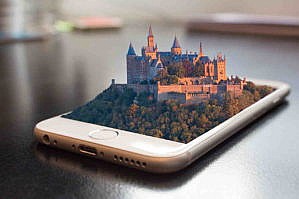
wearable techSurfing along the crest of this radical wave of new technologies is augmented reality (AR). Sometimes referred to as “blended reality,” it allows users to experience the real world, printed text, or even a classroom lesson with an overlay of additional 3D data content, amplifying access to instant information and bringing it to life; in turn, bringing thrilling new opportunities for experiential education.

Perhaps more importantly, AR has the potential to democratize learning and tailor visual or data displays to fit a wide range of individual cognitive strengths. Augmented-reality apps and wearables enable access to rich, immersive educational experiences, and have the potential to differentiate instruction by catering to the specific learning needs and styles of an increasingly diverse student population. Because, let’s face it – many educators on the ground have already realized that a one-size-fits-all approach to curricular material does not always lead to strong learning outcomes.

Learning in Style

A better understanding of what differentiated learning means, in and of itself, may be helpful for developing lesson plans and instructional materials that meet the needs of individual students. Delving into the concept of “learning styles,” for one, can drive home the point that different students perceive and interact differently to information within their learning environment and, therefore, have varying preferences and necessities in terms of how they’re taught. (However, I should note that research on learning styles is an area of study that continues to evolve, so there is no definitive consensus on how to address this increasingly relevant issue in education as of this writing.)

To illustrate how AR can provide various entry points to learning, let’s discuss a few examples of learning preferences that researchers have identified, along with potential AR experiences that could speak to those learning styles.

Visual Learners

EclipseMany students learn best when they’re able to access visual rather than verbal information. Whereas classroom materials that integrate visuals might include presentation slides, textbooks, handouts and the like, AR takes visuals to the next level. Augmented Chemistry, a tangible user interface (TUI), is an example of the visual affordances of AR. Using TUI, chemistry students can pick up virtual atoms, position them to compose molecules, and rotate the 3D molecule to view it from all angles.  Compare this learning experience to the use of traditional textbooks consisting of 2D images that can’t be manipulated – the latter now seems pretty, well, flat in comparison, no?
Kinesthetic Learners

Kinesthetic learners respond well to physically engaging exercises, which place-based or location-based AR can offer in spades. Geological positioning systems (GPS) within place- or location-based AR systems give users access to relevant information as they arrive at a location, requiring them to physically move within an environment to complete tasks. AR provides kinesthetic learning opportunities, too, by allowing users to use bodily motions to manipulate virtual objects.

Social, Field-Dependent, and Application-Directed Learners

Researchers have also identified a learning-styles dimension that emphasizes the social aspect of learning. To wit, some learners desire interaction with others as a means of co-constructing knowledge. In addition to a preference for interacting with others, field-dependent learners rely on an external frame of reference (which may be provided by other learners); and then there are application-directed learners, who mainly prefer concrete applications of subject matter. Through leveraging connected learning and providing a virtual platform for social activity, AR has the potential to meet the needs of such learners.   

For example, in Environmental Detectives – an augmented-reality simulation game – users role-play environmental scientists. Players move about in a real space while being provided with location-specific information. They interview non-players to gather info, and they’re able to beam data to one another. Such a game incorporates social aspects of learning while also accommodating users who learn by interacting with an external frame of reference, as well as those learners who benefit from concretely applying their knowledge in a scenario.

Wave of the Future

Mobile Phone

With so many possibilities and applications, AR could truly be a game-changer in education. It allows for dynamic instruction that can’t be accomplished through traditional classroom experiences (without, of course, replacing the classroom altogether). Think of it as a powerful supplemental learning tool with the awesome ability to reach every style of student.

So join the Learning Lab team as we continue this journey and further explore the exciting realm of unprecedented opportunities AR presents us with here in higher ed. Together, we’ll face this new wave of immersive technology with open arms, encouraging educators to push the boundaries of teaching and, ultimately, the very boundaries of learning itself.

Recipe for Quick Coding: How to Cook Up a Good Glossary, Fast

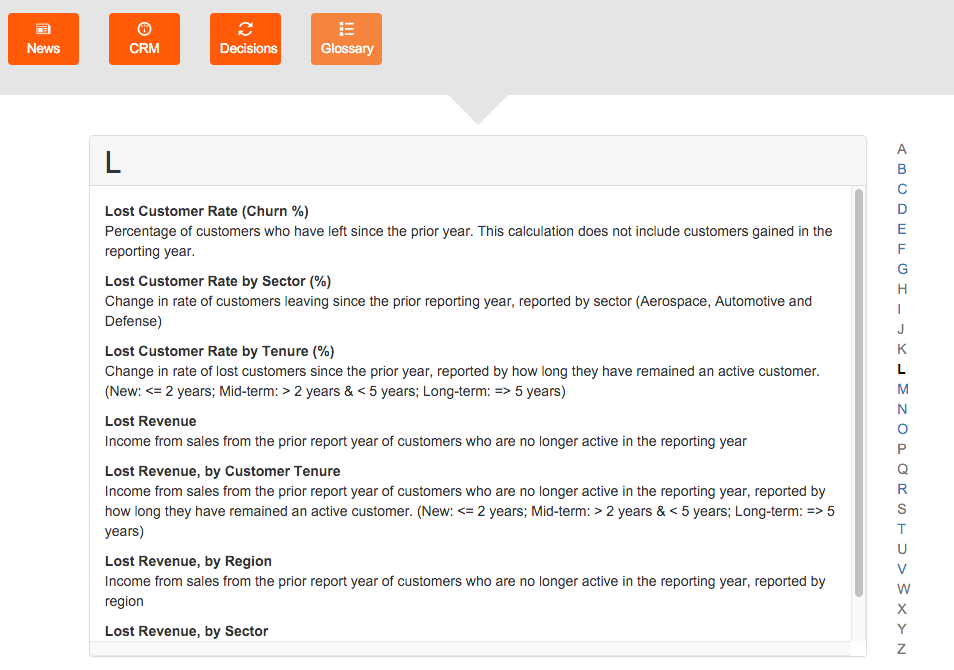
glossaryTwo weeks before the Learning Lab’s new Customer Centricity simulation was set to go live for the first time in a Wharton MBA class, I was asked to add a CRM glossary to it – one that could grow as more data reports became available to a player throughout the course of the game.

Suffice it to say this was a quite a task given the timeframe. Nevertheless, I approached the challenge with an open mind and a lot of quick thinking. Viewing it as a somewhat exploratory endeavor, I managed to meet the deadline and our sim made its scheduled debut with a fresh-baked working glossary. Now, having devised an efficient process for whipping one up on the fly, I’d like to share with you my recipe:

Read more Recipe for Quick Coding: How to Cook Up a Good Glossary, Fast